traefik
This post is a response to a comment from one of my subscribers, who suggested the topic for the next post:
… how to set up Docker so the LB routes straight into the right containers
How do I see the task?
- Development is done in containers;
- Several projects, possibly related, may be running at the same time;
- In front of the projects we need to deploy an
LBthat automatically picks up the running services and routes traffic to them.
I’ll describe a fairly simple approach using traefik1. It’s not the only correct approach, but it’s
straightforward and easy to reproduce in a local environment. Whether to apply it in your own projects is up to you.
Let’s assume you’ve already got dnsmasq2 set up, or that you’ve added the hostnames to /etc/hosts the old-fashioned way.
To start, let’s spin up a traefik container:
services:
  reverse-proxy:
    image: traefik:v2.10
    command: --api.insecure=true --providers.docker
    ports:
      - "80:80"
      - "8080:8080"
    volumes:
      - /var/run/docker.sock:/var/run/docker.sock
Port 80 is our entry point; 8080 hosts the nice traefik admin UI. The socket volume is mounted so that traefik
can react to events when other containers are created.
Hostname info will live in the containers’ labels. For clarity, let’s create two more docker-compose files
describing two services — each file emulates a local deployment of an independent project:
---
services:
  svc1:
    image: hashicorp/http-echo
    command: -text="svc1"
    labels:
      - "traefik.http.routers.svc1.rule=Host(`svc1.dmz`)"
---
services:
  svc2:
    image: hashicorp/http-echo
    command: -text="svc2"
    labels:
      - "traefik.http.routers.svc2.rule=Host(`svc2.dmz`)"
On startup, traefik will automatically pick up the configured addresses and proxy traffic to them.
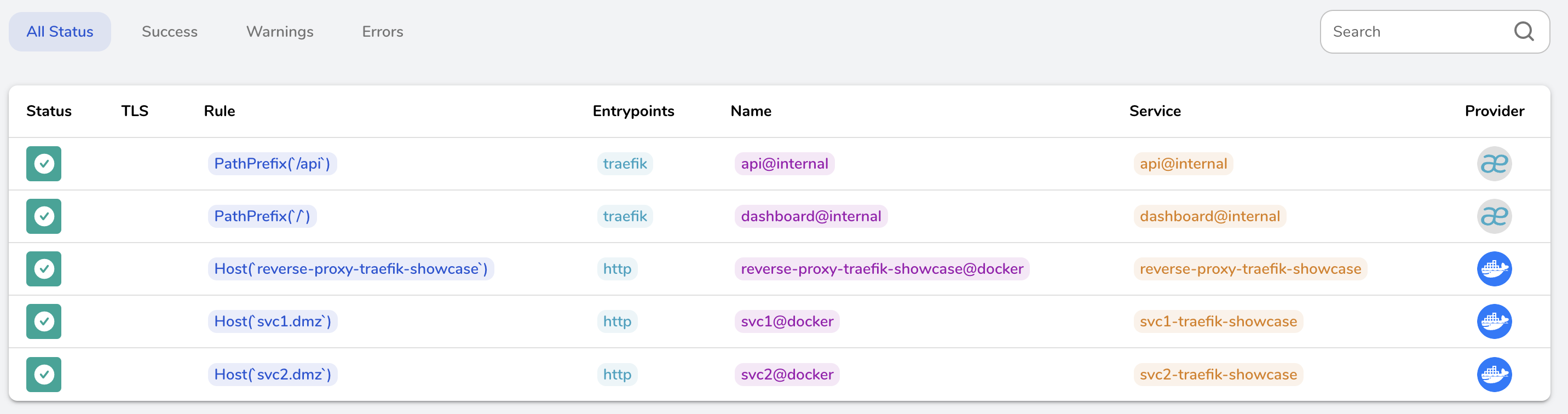
Let’s call out a huge advantage of this approach — there’s no need to publish ports through which the services would be reached from the host. That takes the headache of picking and remembering free ports for new projects off the table.